


BeVision M1 Automated Static Image Analyzer
Couldn't load pickup availability

Still have questions? Ask our experts!
BeVision M1 Automated Static Image Analyzer
Introduction
Key Features
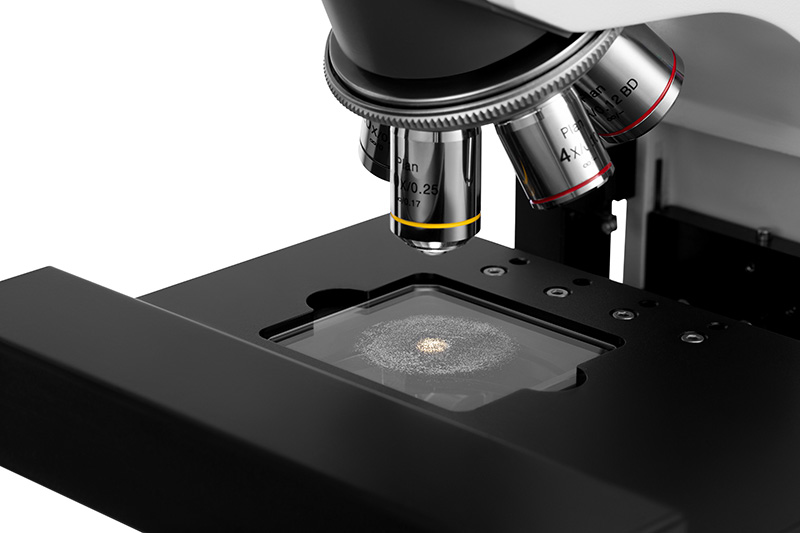
The BeVision M1 provides an accurate analysis of particle size and shape in the range of 0.3 - 10,000 μm. Besides, the BeVision M1 can be a vital part of the surface cleanliness test and film defects inspection.
Through precise auto-scanning and auto-focusing, the BeVision M1 captures high quality images, offering a full view without particle loss and distortion.
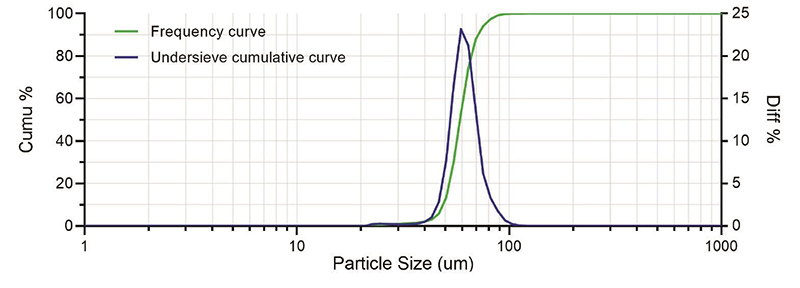
The BeVision software helps you evaluate particle size and shape from 34 different aspects, and further organizes the data into an all-around validation of particles.
1. Why Image Analysis Method?
-
Easy
Capture an image of particles, identify particles, then measure their size and shape. Every step of image analysis is easy and clear.
-
Shape analysis
Based on a direct view of particles, it is possible to analyze not only the size of particles, but also their shape.
-
Seeing is believing
The image analysis method determines the size and shape of every individual particle and then sums it up to form a statistic. Details of particle size or shape distribution can be accurately provided.
2. Why Static Image Analysis Method?
-
Clear vision
In static image analyzers, precision microscopes and high-resolution cameras are specialized for high - quality particle images.
-
Undersized particle sensitivity
The static image analysis method is sensitive to undersized particles; it is even possible to estimate the size of undersized particles.
-
Small sample volume
The static image analysis method requires a small volume of samples. A few drops of emulsions or a few micrograms of powders are enough to do a measurement.
3. Efficient Scanning Mode and Limit - breaking Panoramic Mode
3.1 Scanning Mode
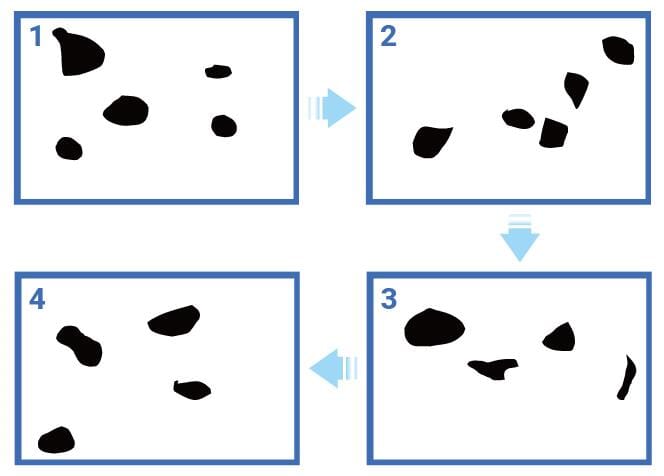
The workflow of the BeVision M1 scanning mode is to capture an image first, then analyze the image while moving the stage, capture the next image once the stage has reached a new position, and repeat.
The BeVision software will display real-time results during the scanning process. The scanning mode is widely welcomed in different industries with its efficiency and reliability.
-
Efficient and reliable scanning mode
Compared with the manual test, the automatic scanning process improves the test efficiency, doing the image capturing and stage moving simultaneously pushes the efficiency to the next level. The efficient scanning mode analyzes many particles in one test, thus strengthening the statistical significance of the result.
- Features and benefits
* Automatic scanning measures size and shape results fast and conveniently.
* High-precision motion control guarantees less particle loss and no repeated capture.
3.2 Panoramic Mode
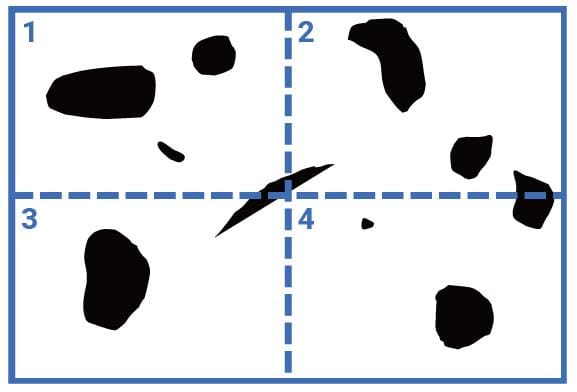
The panoramic mode is to stitch separate images into a full view that records all particles in a millimeter-level region and keeps their shape details.
With a panoramic image, it is easy to measure the total number of particles or defects, and to locate and classify them based on size and shape parameters.
- Features and benefits
* Automatic focus adjustment throughout scanning guarantees high-quality images and accurate results.
* Conditional filter based on size and characteristics helps particle count and classification.
* Rescanning in a higher magnification helps in-depth analysis.
4. Particle Size and Shape Parameters
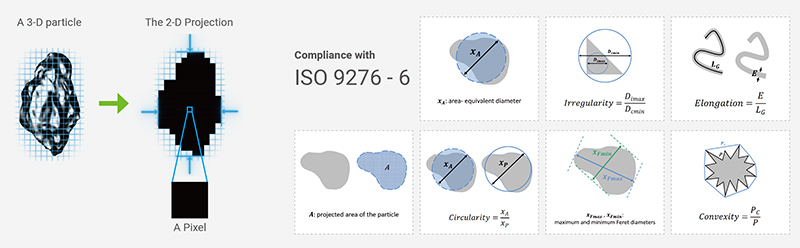
4.1 Size parameters
Equivalent diameters:
- area-equivalent diameter
- perimeter-equivalent diameter
Feret diameters:
- maximum and minimum Feret diameters, XLF ("length")
Martin diameters:
- maximum and minimum Martin diameters
Legendre ellipse:
- major and minor axes
4.2 Shape parameters
Size difference in 2 directions:
- aspect ratio
- L/W ratio
- ellipse ratio
Round-likeness and rectangle-likeness:
- circularity (11 optional algorithms)
- irregularity
- compactness
- extent
- box ratio
Contour concavity:
- concavity
- convexity
- solidity
For elongated particles:
- elongation
- straightness
5. Typical Applications

Specifications
General
| Item | Description |
|---|---|
| Measuring Principle | Static image analysis method, automatically scanning |
| Parameters | Particle size, shape, size & shape distribution, particle count, cleanliness |
Measurement Performance
| Item | Description |
|---|---|
| Measuring Range | 0.3 – 10,000 μm |
| Typical Measurement Time | 3 to 10 min* |
| Scanning Range | 55 × 55 mm |
| Functions | Scanning mode, panoramic mode, single image analysis, batch image analysis |
Main Device
| Item | Description |
|---|---|
| Microscope | Metallographic microscope |
| Light Source | Reflective light (halogen lamp), transmitted light (Köhler illumination) |
| Optical Lens | 4×, 5× BD, 10× BD, 10×–20× (with 40× digital magnification)** |
| Camera | CMOS, 12 MP, up to 120 FPS |
System Parameters
| Item | Description |
|---|---|
| Dimensions (L × W × H) | 35.0 × 65.0 × 67.0 cm |
| Weight | 18.7 kg |
| Supply Voltage | 100 / 240 V, 50 / 60 Hz |
Software
| Item | Description |
|---|---|
| Conformity | ISO 13321, ISO 9276, ISO 16232, ISO 4406 |
| Reports | Integrated report editor |
Computer Requirements
| Item | Description |
|---|---|
| Operating System | Windows 10 or Windows 11 (64-bit) |
| CPU | Intel Core i7 – 13700 or above(not compatible with 14th-gen CPU) |
| Memory | DDR4 32 GB or above |
| Storage | SSD, 1 TB or above |
| Ports | At least 1 Ethernet port and 1 USB 3.0 port |
| Screen Resolution | 1920 × 1080 or higher |
BT-910 Dry Powder Dispersion Module
| Item | Description |
|---|---|
| Dimensions (L × W × H) | 23.5 × 16.5 × 26.6 cm |
| Weight | 4.3 kg |
| Supply Voltage | 100 / 240 V, 50 / 60 Hz |
| Dispersion Air Pressure | ≤ -60 kPa |
Download the Manual Here: